
Bills and purchase orders: see what you owe
Core · Enter & pay supplier bills
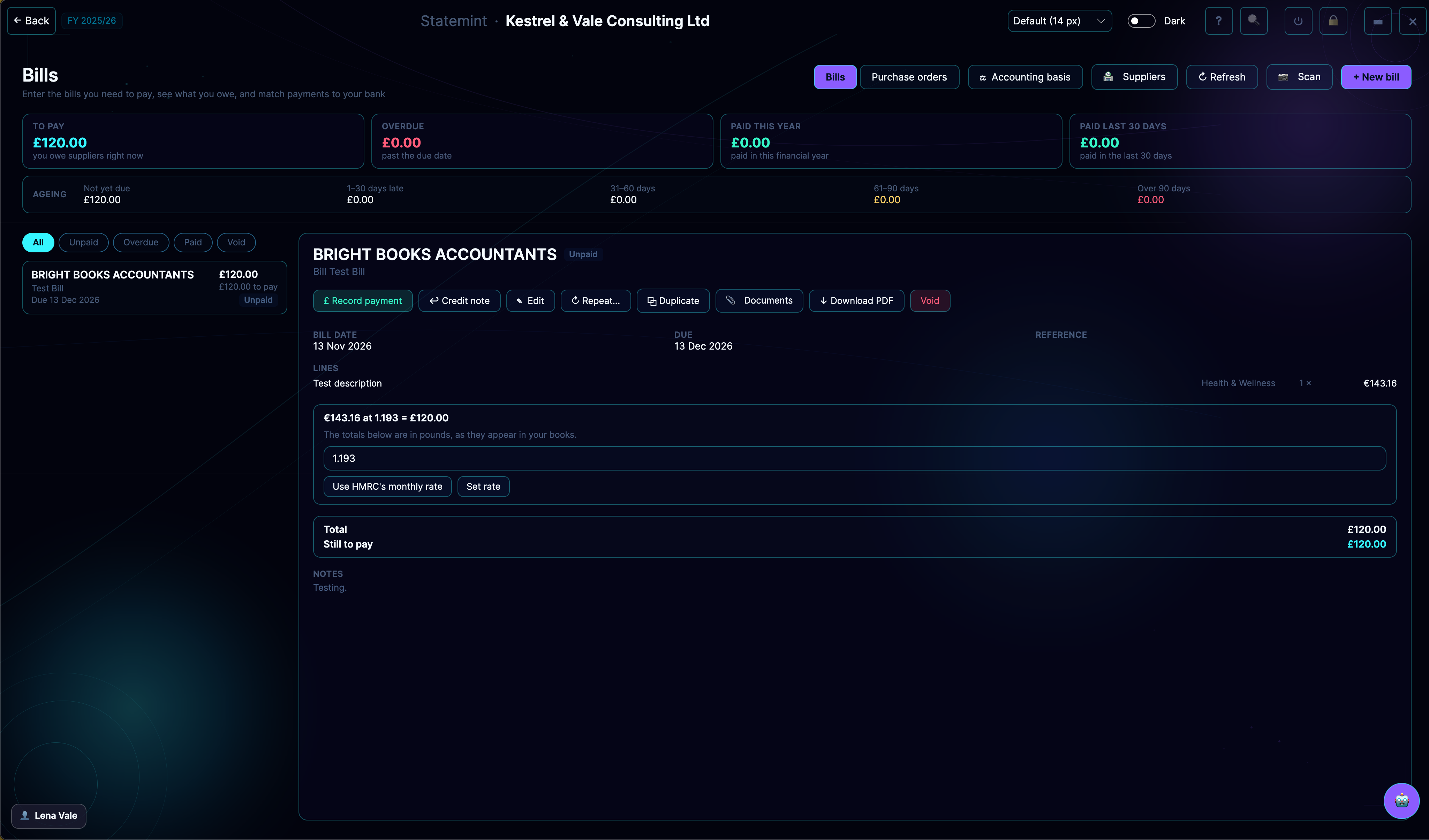
Keep every supplier bill in one place and see what you owe at a glance. Scan a bill or receipt, record payments against your bank lines, raise purchase orders first if you prefer, and handle supplier credit notes.
What you can do
- Enter bills with a category on each line so every cost is classed correctly
- Scan a PDF or photo and let Statemint AI read it, then check the figures before you create the bill
- Record payments and link them to the matching bank lines
- Raise a purchase order, email it to the supplier and convert it to a bill
- Repeat or duplicate a bill, and attach the supplier's PDF, which is stored encrypted
- Pick cash or accrual treatment, so costs land when money moves or when the bill is dated
Who it's for
Available to business accounts. Sole traders · Limited companies · Accountants & bookkeepers
Included in your plan
Every plan includes every feature for its business type, so Bills is part of your plan. See pricing.
Related features
SuppliersSpend & income sourcesTransactionsBrowse & categoriseCategoriesManage categoriesRecurringRepeating bills & invoicesExpensesTrack business expensesVAT ReturnsCalculations & filing
More Core features · All features